Power Platform 2021 Wave 1 – My Favourite Features – Power Automate

01. Search records in Microsoft Dataverse using relevance search

This feature allows to perform the Relevance Search from Power Automate cloud flows. The results returned in this search will be similar to what you will get when you search using the global search box in the navigation bar on Dataverse.

Public Preview – Not Announced | Early Access – March 2021 | General Availability – June 2021
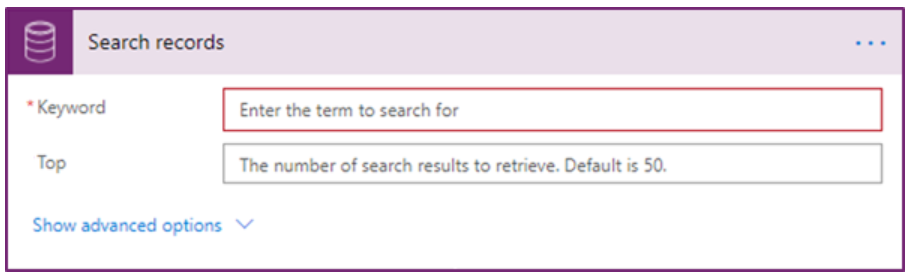
“With this feature, you can create cloud flows that include a Microsoft Dataverse action to search records using relevance search, which is an AI-based fuzzy search that’s built on Azure Cognitive Search. Apart from basic cross-entity search, this action provides support for matches based on Lucene query syntax. This gives you capabilities like Boolean operators, wildcards, fuzzy search, proximity search, term boosting and regex matching.”

https://docs.microsoft.com/en-us/power-platform-release-plan/2021wave1/power-automate/search-records-dataverse-using-relevance-search

02. Trigger flows when a Microsoft Dataverse action is called

Traditionally, we write plugins to execute custom logics on Action events but cannot trigger a classic workflow when an action is performed. With this new feature addition to Cloud flows, we will be able to create flow that trigger when an action is executed. This will be a very handy feature especially when we are adopting to more and more low-code or no code development.

Public Preview – Not Announced | Early Access – March 2021 | General Availability – June 2021
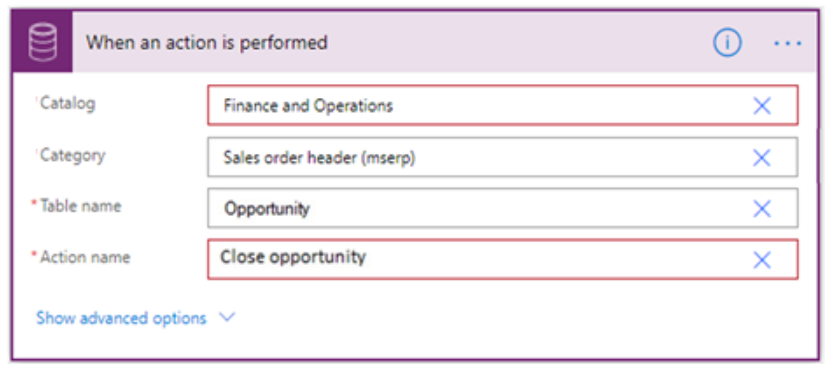
With this feature, you will be able to create flows that trigger when an action is performed in Microsoft Dataverse. This feature improves working with the common events model and even provides better integration with Dynamics 365 Finance and Operations.

https://docs.microsoft.com/en-us/power-platform-release-plan/2021wave1/power-automate/trigger-flows-when-dataverse-action-called

03. Manage solution-based flows

When we go to My Flows area on maker portal, it lists only the flows that are not part of any solution. Normally we will have our cloud flows spread in multiple solutions depending on what solution strategy we follow. In these scenarios, we will have to find the right solution and open the flow from there or we have to check in default solution if our flows are scattered in too many different solutions and if we do not remember which one is in which. Well, with the 2021 Wave 1, we no longer have to navigate to too many different places to find our cloud flows, all of them are going to be listed under My Flows.

Public Preview – April 2021 | Early Access – Not Announced | General Availability – Not Announced

Makers can create and manage solution-based flows in the My flows experience, along with flows that are not in solutions. Here, makers can quickly add any flow into a solution.

https://docs.microsoft.com/en-us/power-platform-release-plan/2021wave1/power-automate/manage-solution-based-flows

Power Platform 2021 Wave 1 – My Favourite Features for Power Apps – Part 4

Async OnSave events

In a model-driven app form, to do any validations on record save, we use OnSave event of the form. We bind the event handler function by directly adding it in form properties OnSave or by binding the handler function using addOnSave (formContext.data.entity.addOnSave). When the record is saved (user clicked on Save / Save&Close or auto-save was triggered or save triggered from code using formContext.data.entity.save / formContext.data.save / formContext.data.refresh(true…)), the OnSave handler function is called and we have to use the formcontext.geteventargs().preventdefault() block the default save, perform validations and then trigger another save. We also have to handle what happens after saved depending on how the Save was triggered. As you can see adding custom logic to OnSave event to perform any validation is not very straightforward and not a clean approach and performing any async calls makes it even more complicated.

With the release of 2021 Wave1, Async OnSave feature will allow a promise to be passed to perform validations and if the promise does not resolve within 10 seconds, the save will be blocked. This provide a lot more cleaner pipeline to hook into OnSave with a flexibility to perform complex validations. I have tried to do some tests on my trial instances but the feature is still not available on my environment. I will update this post with sample code once I had a chance to play with it.

Public Preview – Feb 1, 2021 | Early Access – N/A | General Availability – April 2021

What are Async OnSave events?

This provides the ability to create Async OnSave events. Async OnSave events will now wait when they provide a promise, and there is also a new timeout if the promise does not resolve within 10 seconds. If it does not resolve within 10 seconds, the save operation will be blocked.

https://docs.microsoft.com/en-us/powerapps/developer/model-driven-apps/clientapi/reference/events/form-onsave

Some useful links related to OnSave event

Power Platform 2021 Wave 1 – My Favourite Features for Power Apps – Part 3

Model-driven app adds in-app notifications

In most of the Dynamics CRM / Dynamics 365 CE or Power platform projects I worked on, there were always requirements to display some sort of notification to the user in model-driven apps. Since there is no out of the box way of displaying notifications to users globally, we had to convince the customers to accept sending email or adding an item to the queue as the notification mechanism or form notifications. In some cases, we had to implement custom solutions, sometime using unsupported methods to display messages. There are third party solutions to display notifications but they do have limitations and obviously you have to pay for most of these. In short there was never an easy and supported way to display global notification to user.

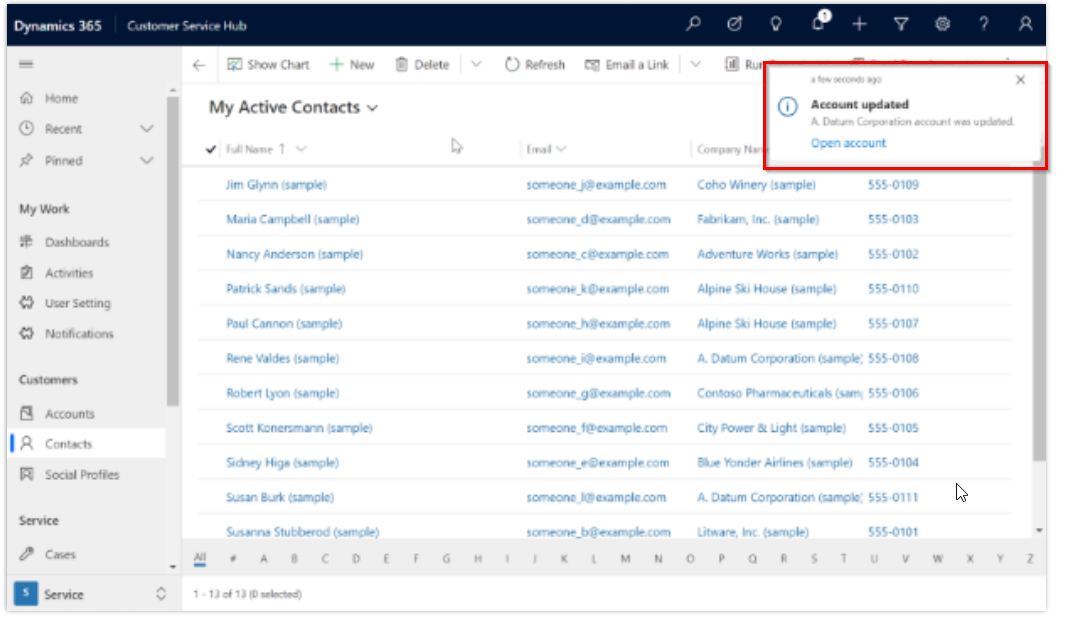
All that is about to change with the release of in-app notifications for model driven apps as part of 2021 Wave 1 release. The feature will only be available for preview in April so I could not do any tests at this point but I will update this post once I have done some testing after the preview is released.

Public Preview – April 2021 | Early Access – N/A | General Availability – June 2021

What is in-app notification?

“Model-driven app in-app notifications are shown to users as a notification toast or notification centre. Notifications are directed to a specific user and can be sent through external systems, Power Automate, or from within the system”

https://docs.microsoft.com/en-us/power-platform-release-plan/2021wave1/power-apps/model-driven-app-adds-in-app-notifications

Toast notification example

Notification Center

Power Platform 2021 Wave 1 – My Favourite Features for Power Apps – Part 2

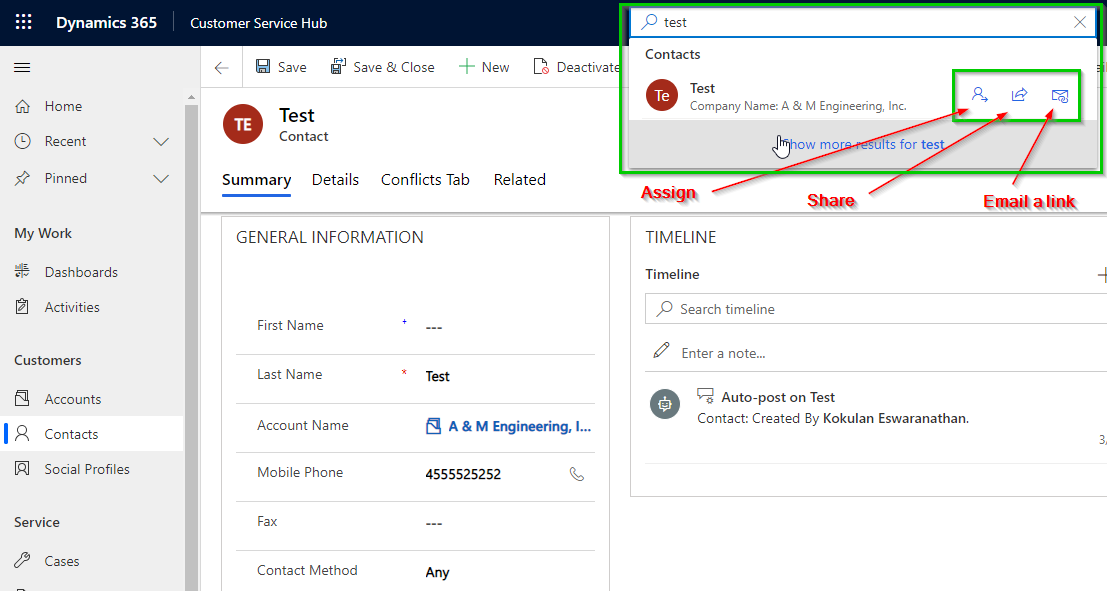
Relevance Search – Quick Actions

The relevance search has been improved a lot in the past few update waves. As part of 2021 Wave 1 another cool new feature has been added to the relevance search results, which is Quick Actions.

Public Preview – Jan 24, 2021 | Early Access – N/A | General Availability – April 2021

What are quick actions?

Quick actions provides quick access to frequently used actions from the suggested results for your typed query. CallAssign, or Share a contact row quickly without losing context”

https://docs.microsoft.com/en-us/power-platform-release-plan/2021wave1/power-apps/search-quick-actions

Please note that if the Relevance Search is not enabled on your environment, you will not see the search box in the top navigation bar.

You can enable the Relevance Search from Power Platform Admin center, as shown in the screenshot below

If you would like to learn more about Relevance Search, please visit the links below

https://docs.microsoft.com/en-us/power-platform/admin/configure-relevance-search-organization

https://docs.microsoft.com/en-us/powerapps/user/relevance-search

Power Platform 2021 Wave 1 – My Favourite Features for Power Apps – Part 1

Multi-line text control automatically expands on quick view form

Quick view form, ever since it was released, has been a very useful feature to display data from a related record without copying or duplicating data to multiple tables. Quick view form does have some limitations but overall it has been a life saver in many recent projects I worked on. One of the key limitations we came across with our recent Power Apps solutions is that a multi-line cannot be formatted on a quick view form to display the content in full in a supported way.

Well with release of the 2020 Wave 1, a multi-line column on a quick view form now automatically expands to display the full content like how the multi-line of text column behaves on a main form.

Public Preview – Jan 24, 2021 | Early Access – N/A | General Availability – April 2021

If you check the properties of a multi-line of text column on classic form designer, there is no formatting tab, so you cannot disable this auto expand feature.

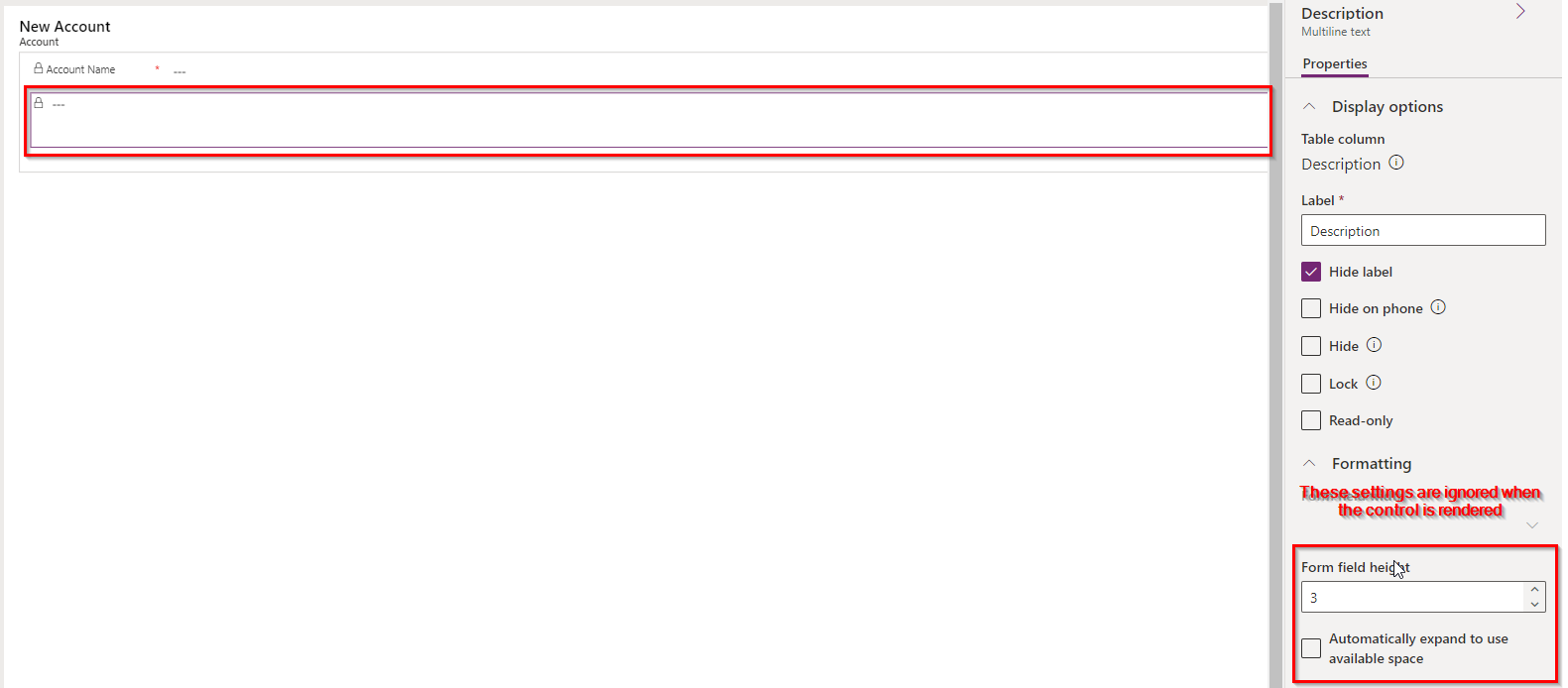
And if you check the properties for the same column on Power Apps portal modern form designer, you have the options to set the number of lines or to enable/disable auto-expand feature but these settings are ignored as of now. In the future, Microsoft might implement features to apply these settings but as of now, they don’t take effect.